
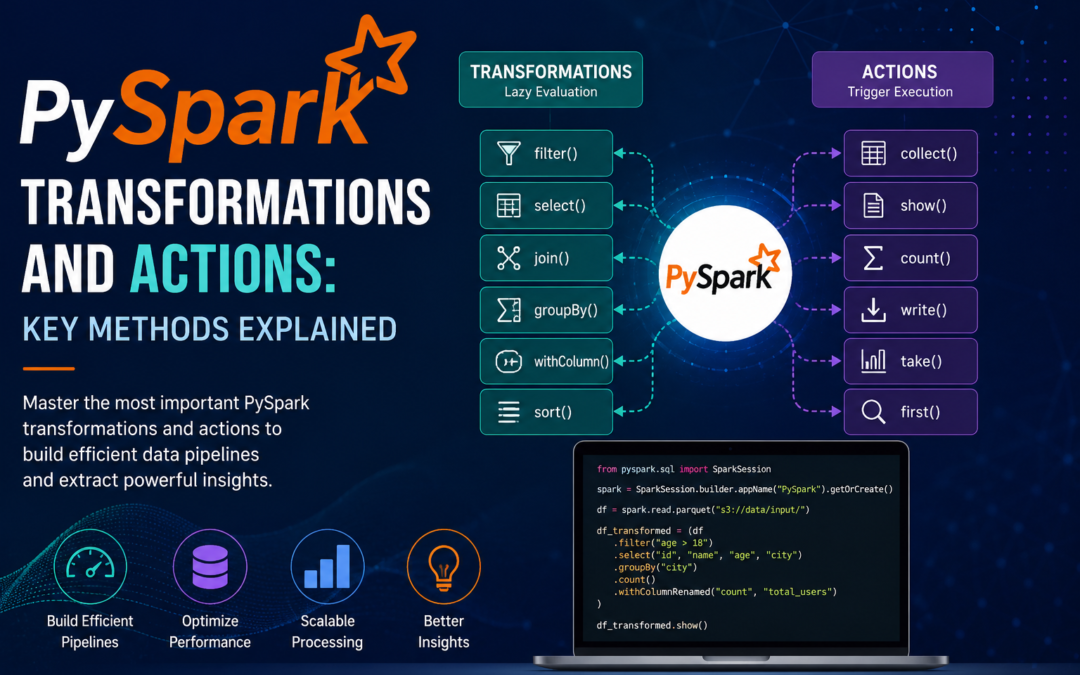
Apache Spark’s distributed computing model relies on two fundamental concepts: transformations and actions. Understanding them is essential if you want to write efficient PySpark code.
Transformations create a new RDD or DataFrame from an existing one. They are lazy — Spark does not execute them immediately. It only builds a logical plan (the DAG).
Actions trigger the actual computation and return a result to the driver or write data to storage.
Below is a clear breakdown of the most important methods in both categories, with simple explanations.
Transformations (Lazy Operations)
These methods return a new RDD/DataFrame and do not compute anything until an action is called.
| Method | Type | Simple Explanation |
| map(func) | Narrow | Applies a function to each element and returns a new RDD/DataFrame with the results. |
| flatMap(func) | Narrow | Similar to map, but each input can produce zero or more outputs (flattens the result). |
| filter(func) | Narrow | Keeps only the elements that satisfy a condition. |
| select(*cols) | Narrow (DataFrame) | Selects specific columns (very common in DataFrame API). |
| withColumn(colName, col) | Narrow (DataFrame) | Adds or replaces a column. |
| drop(*cols) | Narrow (DataFrame) | Removes one or more columns. |
| distinct() | Wide | Returns unique elements/rows. |
| union(other) | Narrow | Combines two RDDs/DataFrames (must have the same schema). |
| join(other, on, how) | Wide | Joins two DataFrames (inner, left, right, outer, etc.). |
| groupBy(*cols) | Wide | Groups data by one or more columns (usually followed by an aggregation). |
| orderBy(*cols) / sort(*cols) | Wide | Sorts the data. |
| repartition(numPartitions) | Wide | Increases or decreases the number of partitions (causes a full shuffle). |
| coalesce(numPartitions) | Narrow | Reduces the number of partitions without a full shuffle (more efficient than repartition when decreasing). |
| sample(withReplacement, fraction) | Narrow | Returns a random sample of the data. |
| mapPartitions(func) | Narrow | Applies a function to each partition (more efficient than map when you need to process whole partitions). |
Note: Narrow transformations do not require data movement between partitions. Wide transformations (joins, groupBy, distinct, repartition, etc.) usually trigger a shuffle.
Actions (Trigger Computation)
Actions force Spark to execute the pending transformations and produce a concrete result.
| Method | Simple Explanation |
| collect() | Brings all data to the driver as a list. Use carefully — can cause out-of-memory errors on large datasets. |
| count() | Returns the number of elements/rows. |
| first() / take(n) | Returns the first element or the first n elements. |
| show(n=20, truncate=True) | Displays the first n rows in a nice tabular format (DataFrame only). |
| takeSample(withReplacement, num) | Returns a random sample of num elements. |
| reduce(func) | Aggregates all elements using a binary function (e.g., sum, max). |
| aggregate(zeroValue, seqOp, combOp) | More flexible version of reduce that allows different operations within and across partitions. |
| foreach(func) | Applies a function to each element (usually for side effects such as writing to an external system). |
| foreachPartition(func) | Applies a function to each partition (preferred over foreach for efficiency). |
| saveAsTextFile(path) | Writes the RDD as text files. |
| write.save(path) / write.parquet(...) / write.csv(...) etc. | Writes a DataFrame to storage in various formats. |
| countByKey() | Returns a dictionary of (key, count) pairs (useful for key-value RDDs). |
| max() / min() / mean() / sum() | Common aggregation actions on numeric columns. |
Quick Mental Model
Transformations = “What should be done” (build the plan)
Actions = “Do it now and give me the result”
Because transformations are lazy, Spark can optimize the entire chain of operations before running anything. This is one of the main reasons Spark is fast.
Best Practices
- Prefer DataFrame/Dataset API over RDDs whenever possible (Catalyst optimizer + Tungsten execution).
- Avoid collect() on large datasets.
- Use coalesce instead of repartition when you only need to reduce partitions.
- Cache (cache() / persist()) intermediate results that will be reused by multiple actions.
- Monitor the Spark UI to see which stages involve shuffles (wide transformations).
Mastering these transformations and actions will help you write cleaner, faster, and more memory-efficient PySpark jobs.