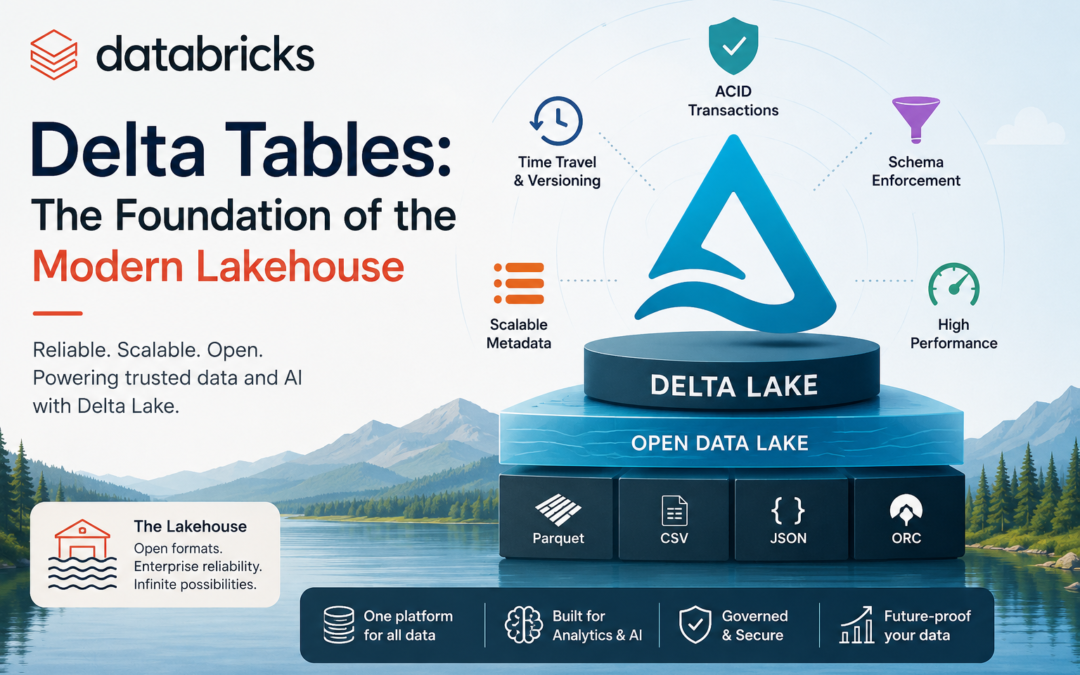
Traditional data lakes offered massive scale and flexibility but often struggled with reliability, consistency, and performance. Data warehouses delivered ACID guarantees and strong governance but at the cost of rigidity and higher expense. Databricks Delta Tables (powered by Delta Lake) bridge this gap, forming the core of the lakehouse architecture that combines the best of both worlds.
What Is a Delta Table?
A Delta Table is a table stored in cloud object storage (such as Amazon S3, Azure Data Lake Storage, or Google Cloud Storage) that uses the open-source Delta Lake format. Under the hood, data lives in standard Parquet files, but a carefully managed transaction log sits alongside them. This log records every change—inserts, updates, deletes, schema modifications—turning a collection of files into a fully transactional table.
On Databricks, Delta is the default table format. When you create a table with `CREATE TABLE` or write a DataFrame with the default settings, you get a Delta Table automatically. No special configuration is required to unlock its capabilities.
Why Delta Tables Matter
Traditional Parquet-based data lakes suffer from well-known problems: partial writes, schema mismatches, difficulty updating or deleting rows, and poor performance on large tables with many small files. Delta Lake solves these by adding a transactional layer while remaining fully compatible with Apache Spark APIs and Structured Streaming.
Key benefits include:
- ACID transactions — Reads and writes are atomic, consistent, isolated, and durable. Concurrent jobs no longer risk corrupting data.
- Scalable metadata handling — The transaction log efficiently manages tables with billions of files and petabytes of data.
- Unified batch and streaming — The same table can serve as both a batch source/sink and a streaming source/sink with exactly-once semantics.
- Open format — Delta Lake is open source and has a well-documented protocol, enabling interoperability with other engines.
Core Features of Delta Tables
1. ACID Transactions
Every write operation is transactional. If a job fails midway, the table remains in a consistent previous state. Readers always see a consistent snapshot, even while writers are active.
2. Time Travel (Data Versioning)
Every change creates a new version of the table. You can query historical data using a version number or timestamp:
SELECT * FROM my_table VERSION AS OF 5;
SELECT * FROM my_table@v2
SELECT * FROM my_table TIMESTAMP AS OF '2026-07-01';
This is invaluable for audits, rollbacks, reproducing ML experiments, and debugging pipelines.
3. Schema Enforcement and Evolution
Delta validates data against the table schema on write, rejecting mismatched records. At the same time, it supports controlled schema evolution (adding columns, changing nullability, etc.) without rewriting the entire dataset. Column mapping further allows renaming or dropping columns efficiently.
4. DML Operations (MERGE, UPDATE, DELETE)
You can perform database-style operations directly on the lake:
MERGE INTO target t
USING source s
ON t.id = s.id
WHEN MATCHED THEN UPDATE SET *
WHEN NOT MATCHED THEN INSERT *;
These operations are efficient because of the transaction log and file-level tracking.
5. Performance Optimizations
OPTIMIZE — Compacts small files into larger ones for faster reads.
Z-ORDER (or liquid clustering) — Co-locates related data to improve data skipping.
Data skipping — Uses min/max statistics and other metadata to avoid scanning irrelevant files.
VACUUM — Removes obsolete files no longer referenced by the transaction log to control storage costs.
6. Change Data Feed
Track row-level changes between versions, making it easy to build incremental pipelines or CDC (change data capture) workflows.
Delta Tables in Practice
Creating and working with Delta Tables feels natural:
# Write a DataFrame as a Delta table
df.write.format("delta").mode("overwrite").saveAsTable("sales.orders")# Or using SQL
spark.sql("""
CREATE TABLE sales.orders (
order_id BIGINT,
customer_id BIGINT,
amount DECIMAL(10,2),
order_date DATE
) USING DELTA
""")
Because Delta is the default on Databricks, many of these details are handled automatically. Features such as liquid clustering further simplify data layout decisions that used to require careful partitioning strategies.
Delta Lake vs. Plain Parquet
While Delta stores data in Parquet files, the transaction log adds critical capabilities that plain Parquet lacks:
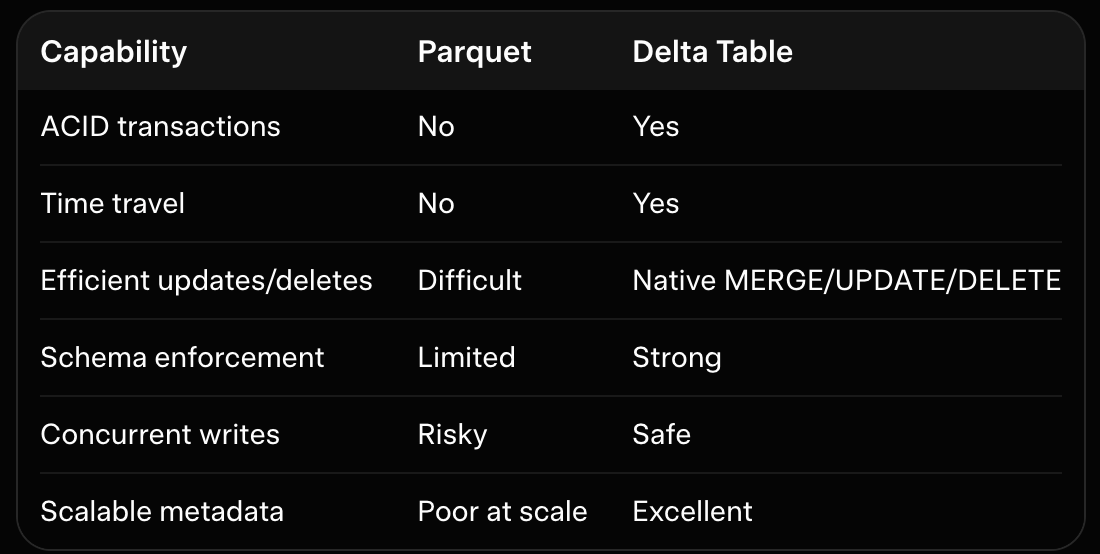
For production workloads that involve ongoing updates, streaming, or multi-user access, Delta is almost always the better choice.
Best Practices
- Prefer managed tables in Unity Catalog when possible—they simplify lifecycle management and governance.
- Use `OPTIMIZE` and liquid clustering regularly on high-volume tables.
- Set appropriate retention periods and run `VACUUM` carefully (never on tables still being actively queried for time travel).
- Leverage Change Data Feed for incremental processing instead of full table scans.
- Combine Delta Tables with Databricks features such as Lakeflow pipelines, Auto Loader, and Unity Catalog for end-to-end reliability and governance.
Conclusion
Databricks Delta Tables transform raw cloud storage into a reliable, high-performance, transactional data platform. By adding ACID guarantees, time travel, schema management, and powerful optimizations on top of open Parquet files, they enable organizations to build true lakehouses—systems that support both large-scale analytics and operational workloads on the same data.
Whether you are building real-time streaming pipelines, running complex ETL, training machine learning models, or serving BI dashboards, Delta Tables provide the consistency and performance foundation modern data platforms require. As the default storage format on Databricks and a thriving open-source project, Delta Lake continues to evolve, making it one of the most important technologies in the data engineering toolkit today.